
CCM and APCM care management
Find potential CCM candidates. Keep the follow-through connected.
Fanoni brings potential CCM candidates, program enrollment, care plans, monthly evidence, time, and billing review into one practitioner workspace.

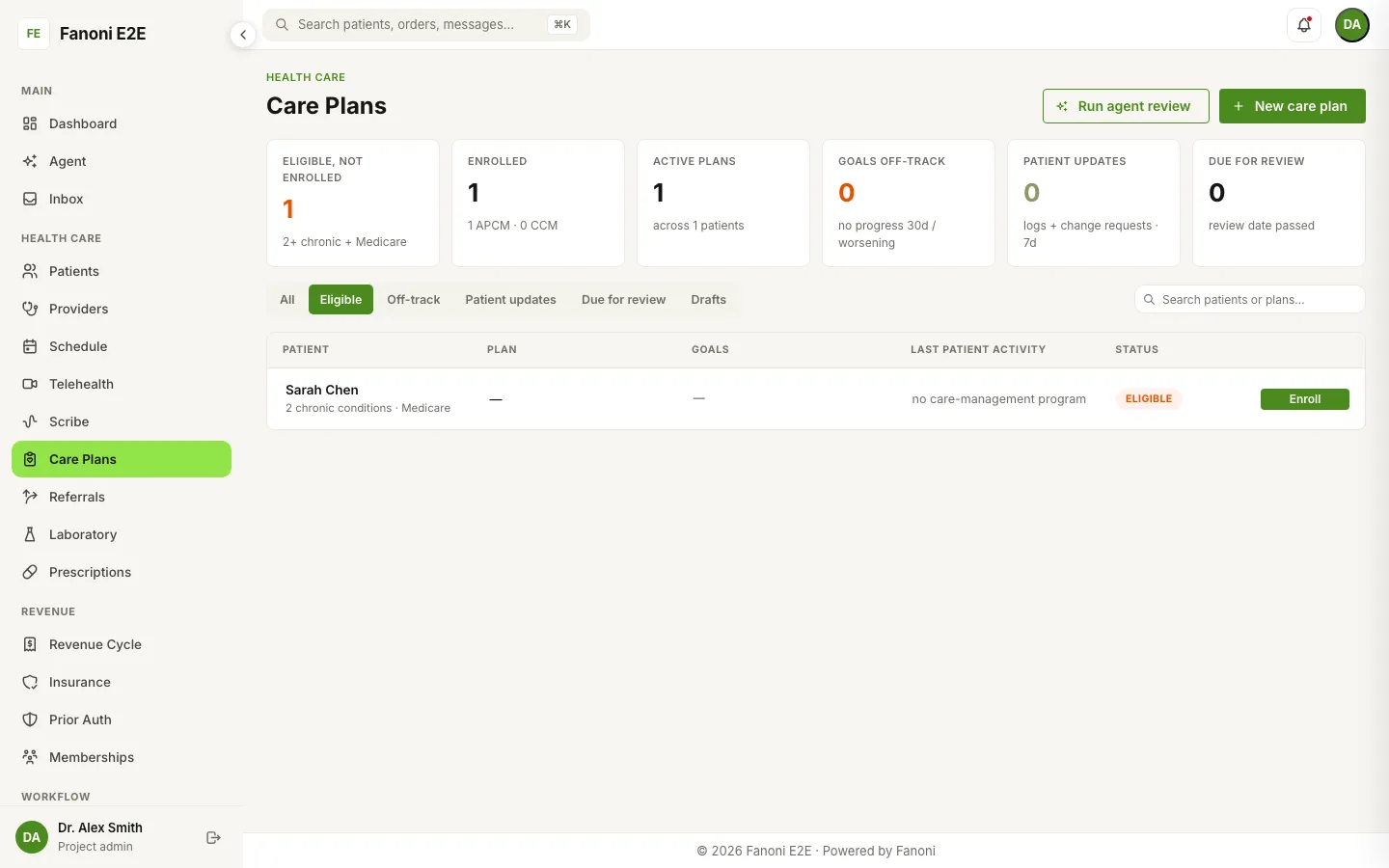
Eligibility is the beginning of the work
Find the starting population
Surface Medicare patients with two or more recorded chronic conditions as potential CCM candidates for staff review.
Confirm the right pathway
Review diagnoses, coverage context, consent, and program requirements before choosing CCM or APCM.
Carry the work forward
Keep the care plan, monthly activity, recorded time, qualification checks, and billing review connected after enrollment.
Built into Fanoni EHR
One view from candidate review to monthly follow-through.
The Care Plans worklist shows potential candidates, enrolled patients, active plans, patient updates, off-track goals, and reviews that need attention.
Potential CCM candidates
Use recorded Medicare coverage and chronic-condition context to create a focused review list.
CCM and APCM enrollment
Choose the supported care-management pathway after staff verifies the patient record and program fit.
Care-plan workspace
Track goals, activities, patient requests, monthly evidence, and review status in the patient chart.
Billing review
Review recorded time, qualification results, blocking reasons, and draft-claim readiness before an authorized user acts.
How it works
A clear path from intake to the next action.
- 1
Review the candidate list
Start with patients whose recorded coverage and chronic-condition context may fit CCM screening criteria.
- 2
Verify program fit
Staff confirms coverage, diagnoses, consent, requirements, and whether CCM or APCM fits the patient workflow.
- 3
Build and manage the plan
Create the care plan, document goals and activities, record monthly work, and review patient updates.
- 4
Review billing readiness
Inspect the monthly evidence, time, codes, qualification checks, and any blocking reason before claim action.
What the product supports
The work around care management, kept together.
Fanoni connects the clinical plan with the operational steps that continue throughout the month.
Candidate review and enrollment
Potential CCM candidate views and staff-controlled enrollment for supported CCM and APCM workflows.
Care plans and goals
Plan creation, goals, interventions, patient tasks, activity history, and clinician review in the chart.
Monthly work and evidence
Time logging, care-plan review, patient communication, patient updates, access-to-care evidence, and monthly review status.
Qualification and draft-claim review
Program-specific checks, visible blocking reasons, code review, and draft-claim preparation for authorized staff.
Questions, answered plainly
What teams ask before a workflow review.
Which care-management programs does Fanoni support?
The current verified care-management workflow supports CCM and APCM. Fanoni does not currently present PCM, CPM, RTM, BHI, or TCM as supported programs.
How does Fanoni identify potential CCM candidates?
Fanoni can surface patients with recorded Medicare coverage and two or more chronic conditions as a potential-candidate list. Staff reviews the source record and current program requirements before enrollment.
Does Fanoni automatically enroll patients or submit claims?
No. Enrollment, consent, coding, qualification, and claim decisions remain with authorized staff. Fanoni organizes the workflow and can prepare a draft claim for review.
What happens after a patient is enrolled?
The team can create and review a care plan, track goals and activities, record monthly evidence and time, review patient updates, and inspect billing readiness in connected Fanoni workspaces.
Is the workflow available for every organization?
Availability depends on the organization’s plan, roles, configuration, clinical data, coverage data, and implementation scope. A personalized demo confirms the exact workflow and dependencies.
Bring your current CCM or APCM workflow.
We will walk through candidate review, enrollment, care-plan work, monthly evidence, and billing review, then identify the configuration and verification your practice needs.